Export AXF data to Shapefile or Excel Spreadsheet
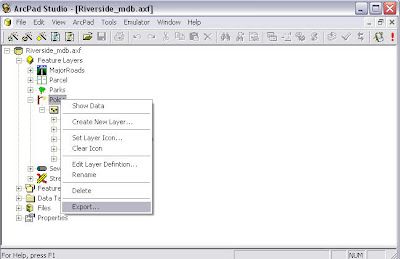
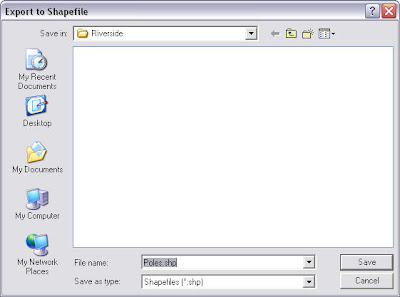
Data in an AXF file can be exported to shapefiles using tools in ArcPad Studio.In this example I opened Riverside.axf sample file in ArcPad Studio.Right click on the Poles feature layer and click on the “Export…” menu item.Then in the “Export to Shapefile” dialogue window I can type in the name for this shapefile and save it.

There's another way to view AXF data in Excel.
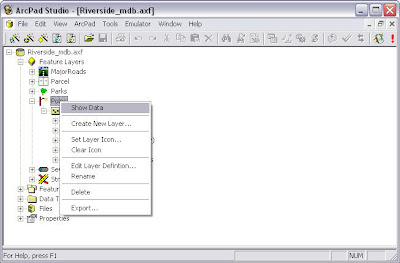
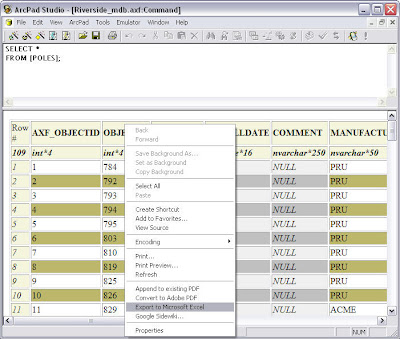
We need to open the AXF data table first in ArcPad Studio.
Then right click on the data table and select the “Export to Miscrosoft Excel” item. Excel program is automatically opened on your computer and the data is shown in the spreadsheet now.
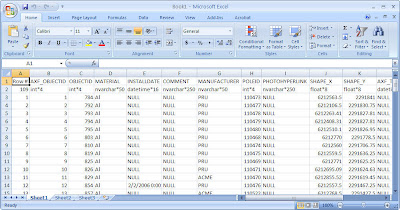


If only a DBF file is needed for Poles layer, I would right click on the “Poles” sub-layer and select the “Export…” item. Then save the DBF file in the “Export to DBF file” window. The DBF file can be opened and viewed in MS Excel.

There's another way to view AXF data in Excel.
We need to open the AXF data table first in ArcPad Studio.

Then right click on the data table and select the “Export to Miscrosoft Excel” item. Excel program is automatically opened on your computer and the data is shown in the spreadsheet now.


posted by Claire @ 07:51



 News Feed (Atom)

<< Home