
Last year Microsoft released the
Ultra-Mobile PC family (UMPC). For those of you that haven’t already heard of these, they are a range of devices that are smaller and lighter than a notebook PC, have a pen input display and run the Tablet PC version of Windows.
So is an UMPC a good device choice for ArcPad?Any of you that have been researching potential devices or have experience in deploying ArcPad in the field know that a perfect field device choice is near impossible! On the ArcPad team we have had the opportunity to work with many devices over the years. Although we come across many devices that are very good and near for perfect for
some applications, we have yet to encounter a device that is perfect for
every ArcPad mobile application.
So the answer is
“It depends”... on you
So let’s briefly look at some of the features of the UMPC which might make it a contender for your ArcPad application.
We prefer not to promote any specific manufacturer’s devices, preferring you to make choices based on your own criteria. However I thought it useful to describe the UMPC based on my own experience with a specific device, the
ASUS R2H.
- Display: Typically a UMPC has a 7” display at 800x480 resolution. The R2H is no different. I love having a 7” display for maps, especially when making use of ArcPad’s symbology capabilities. Indoors the screen is clear and bright. Outdoors it is useable but not great. A device’s screen quality in the target environment is often a critical factor. I have to suggest you see a UMPC in outdoor conditions to see for yourself what you think.
 Input: UMPCs have pen operated displays. Like on a Pocket PC you can use the pen just like a mouse, use a popup keyboard or try the handwriting recognition support in Table PC Windows. I’m not the biggest fan of handwriting recognition on Pocket PC’s, but I have to say on the UMPC is not bad and with a bit more patience it can work well for you. UMPCs also support voice input, but I have to say my experience in applying it to ArcPad is limited so far.
- Performance: You’ll love the speed of ArcPad on a UMPC especially you’re a long time Pocket PC user of ArcPad. Most UMPC’s have a 900+Mhz CPU. This is by no means fast compared to the most PCs these days and would not be your choice to run ArcMap, but for ArcPad it’s great. ArcPad has always been designed to run on slower Pocket PC CPUs with little memory. So when you put ArcPad on an UMPC it really flies. You’ll probably love it if you use large raster layers and vector drawing speed is great.
- Storage: My model of the R2H has a 60GB hard drive, typical for an UMPC is a 40gb to 60gb drive. After the operating system and ArcPad are installed there is still plenty of space for your data. The R2H also has a SD card slot making it very easy to exchange data with Pocket PC users, just put in the card and access it directly from ArcPad just like on a Pocket PC. You can also use a USB drive for very durable low cost solid state storage.
- Ruggedness: The R2H is 'reasonably' durable but not rugged in the sense of harsher environments with heat, dust and water. It's small enough to encase and not make it too large however this could have some effect on its cooling. I find the R2H gets quite warm in use, so in ruggedizing it I would have to take care so that the cooling remains effective.
 Battery life: Not a strong point. It’s more like a notebook getting around 2hours on the standard battery. I have ordered a double capacity battery for mine to extend it to nearly 4hours. The good thing is that the batteries don’t seem too expensive and are easily changed in the field alllowing you can carry multiple and extend the in field time.
 Peripherals: Like most UMPCs, the R2H has 3 USB ports making it easy to plug in a DVD drive to install software, a keyboard, mouse and other USB peripherals. This makes it easy to setup and work with when at a desk. The R2H also has a built in camera.
- Connectivity: Built in wireless LAN, Bluetooth and Ethernet port allows easy connections in almost any network environment. As it is a PC you don’t use ActiveSync, so file transfer is just a matter of copying files as you would with any other PC. It can be accessed via a network or you can transfer using SD card or USB drives.
 GPS: The R2H has a built in GPS, something not yet common on other UMPCs. Connecting up a GPS is often a hassle for users, but devices having a GPS built in makes it a breeze ellimenating cable and battery issues. On the R2H you do have to run a little program to enable the GPS, but this can be made part of your start up to keep it simple. The built in GPS uses the SiRF chip and delivers acceptable performance as compared with other similar consumer style GPS devices. If you want precision you can attach a higher quality GPS via bluetooth or USB.
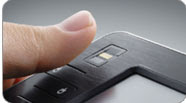 Security: The R2H has a fingerprint reader. This allows you to configure the device so you just swipe your finger to logon. This is great for multiple users with different settings and it adds a level of data protection if used wisely.
Some ArcPad vendors are starting to offer the UMPC, for example
ESRI China (Hong Kong) has an ArcPad bundle based on the Samsung Q1 UMPC.
http://www.esrichina-hk.com/products/software/news/ESRI%20and%20Samsung%20Bundle%202007.htm
In conclusion there is no substitute in choosing a device than for you to try one out for yourself, in your target ArcPad environment and in the hands of the intended user. The UMPC adds dimension to the range of mobile devices suitable for ArcPad and the ASUS R2H is a worthy unit to evaluate.
Labels: ArcPad, Mobile GIS, Tablet PC, UMPC
 Shobana has joined the ArcPad team this week and is warmly welcomed.



 News Feed (Atom)

